10Linux command line
Moving files and folders
Easy10MIN
You can use the command line at the bottom of the page to practice commands. Finally, execute the given tasks on the same command line.
Renaming and moving files and folders can be done with the mv command, which comes from the word move.
BASH
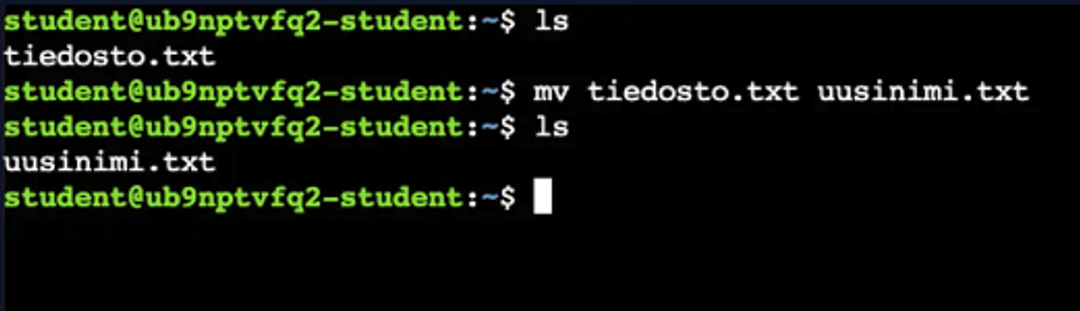
1mv old.txt new.txtIn the image below, we are renaming the file.
Using the same principle, you can move files or folders by first specifying the original location and then the destination.
BASH
1# move the file to the folder
2mv file.txt folder/
3
4# move all files ending in .txt to a folder.
5# The * character symbolizes the wildcard character.
6mv *.txt folder/
7
8# move the file from the folder to the current working directory.
9The # dot symbolizes the current working directory.
10mv folder/file.txt .
11
12# move the folder "folder2" to the current working directory.
13mv folder/folder2 .
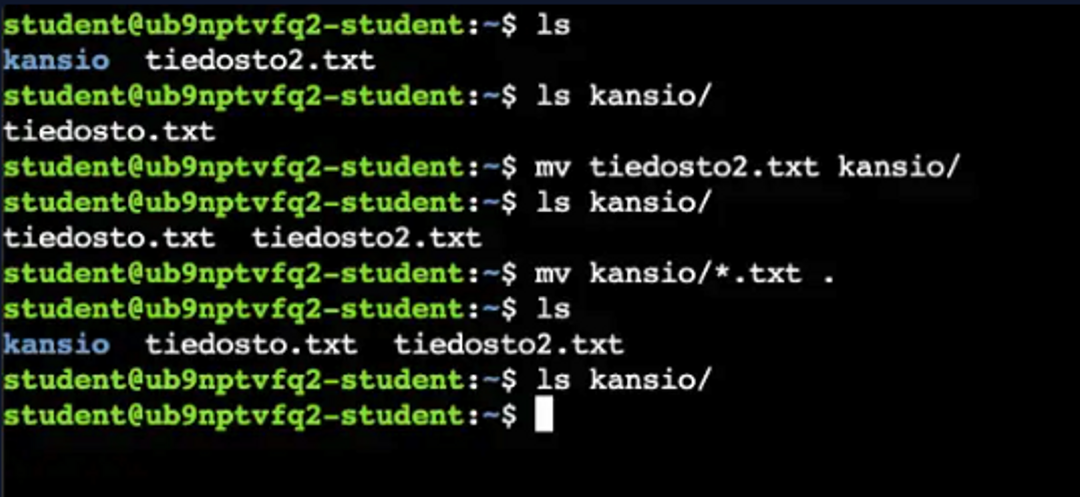
In the image below, we first move the file named tiedosto2.txt to a folder, and then we move both txt files back to the current working directory using the wildcard (*) and dot.
1 / 2
Hakatemia Pro
Learn to hack — start here
Hundreds of interactive courses, virtual labs and CTF challenges in your browser. Start a free trial — no card required.