Controlling the output
You can practice the commands covered in the material on the command line at the bottom of the page. Finally, execute the assigned tasks on the same command line.
The echo command is used to print text to the command line.
1echo "text"In the image below, we are executing the echo command and printing the text "hello everyone".

In the Linux command line, it is possible to redirect outputs to a file. This is done using the *< *or *> *characters.
1echo "Text goes to" > file.txtBy using one *> *character, the command line overwrites all the content already present in the file. If you want to redirect the output to a file without overwriting the existing content, use two *>> *characters.
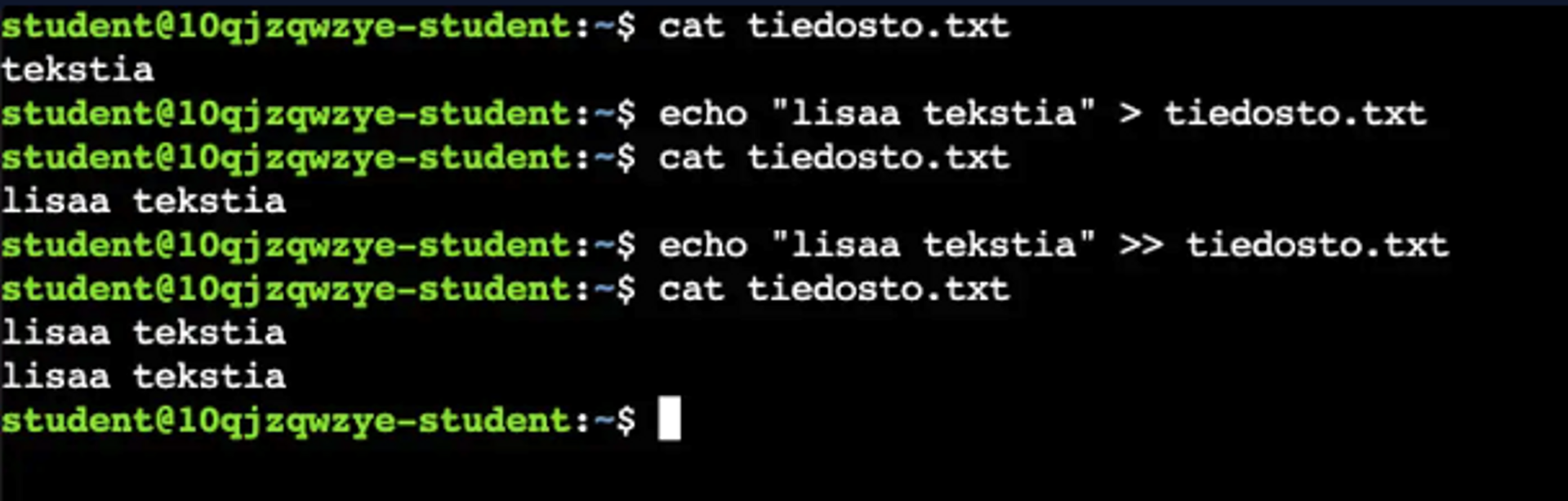
In the image below, we redirect two prints to a file. We notice how using a greater-than sign (>) overwrites the existing file, and how using two greater-than signs (>>) appends to the end of the file. It is important to note that if the file does not exist before redirecting, the command line will create a new file.
Redirecting output may seem simple and even unnecessary at this stage, but it is an important part of using the command line. For example, you could redirect the output of one command to the next command.
Learn to hack — start here
Hundreds of interactive courses, virtual labs and CTF challenges in your browser. Start a free trial — no card required.